
Gemini 4 Neon review & Comparision with GPT 6.2
Google DeepMind is on a tear. Just days after dropping Gemini 4 Carbon and Hydrogen, they’ve released a third model: Gemini 4 Neon.
It isn’t even their flagship model, yet it immediately took the #1 spot on coding agent benchmarks. Naturally, I had to put it through its paces—testing it on game development, full e-commerce builds, and a head-to-head web development showdown against its direct rival, GPT-6.2 Sol.
Spoiler alert: it didn’t just beat GPT-6.2 Sol. Even on medium settings, Neon ran circles around it.
Where Gemini 4 Neon Fits in the Lineup
Gemini 4 Neon replaces the Argon model in Google’s ecosystem. Built on the Carbon architecture, it’s designed to be the practical middle ground between Carbon (smart, but slower and pricier) and Hydrogen (blazing fast, but less capable).
| Feature | Gemini 4 Carbon | Gemini 4 Neon | Gemini 4 Hydrogen |
| Role | High-intelligence flagship | Mid-tier sweet spot (replaces Argon) | Fast, lightweight execution |
| Intelligence Score | 60 | 61 | 54 |
| Thinking Levels | 3 (Low, Medium, High) | 4 (Low, Medium, High, Extra High) | N/A |
| Pricing (per 1M tokens) | Higher tier | $3 Input / $15 Output | Budget tier |
At $3 per million input tokens and $15 per million output tokens, it hits a very attractive price-to-performance ratio—especially considering it actually edges out Carbon on the intelligence index and adds an “Extra High” thinking level.
The Benchmarks (and Why the Comparison Feels Off)
On the Artificial Analysis Intelligence Index, Gemini 4 Neon ranks #3 overall with a score of 61, sitting right behind Fable 5.2 and GPT-6.2 Astra while edging out Claude Opus 5.5 on paper. It also posted top scores across Terminal-Bench 4.1, SearchHQ.ai (#1), and even Tax Agent benchmarks.
Google is marketing Neon directly against GPT-6.2 Sol, which honestly feels like underselling it. While GPT-6.2 Sol is cheaper, Neon’s actual output quality puts it in a completely different league.
The Real Game Changer: Orchestrator Mode in Google Antigravity
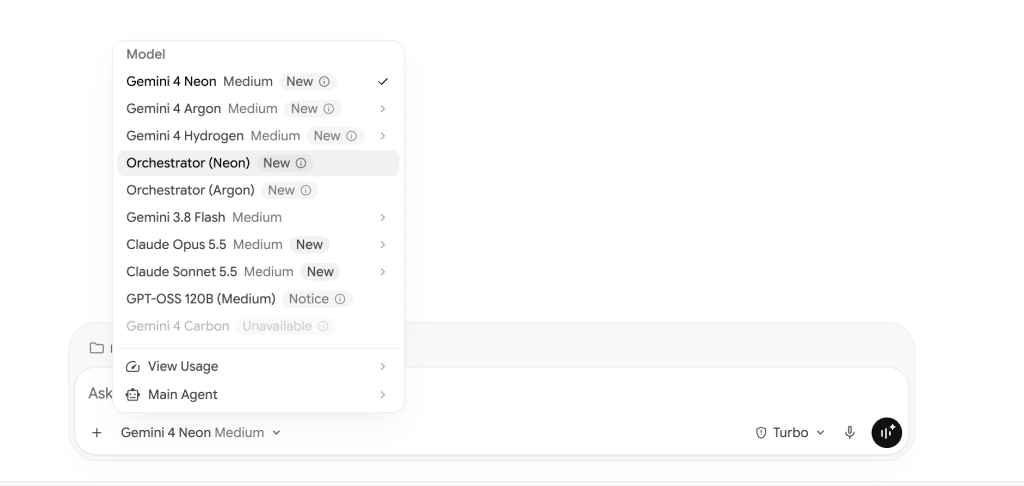
If you’re building apps or websites, the biggest news isn’t just Neon on its own—it’s that Neon is now available inside Orchestrator Mode in Google Antigravity.
If you haven’t tried Orchestrator Mode yet, here is why it’s such a big deal:
- The Heavy Lifting: You assign a smart model like Gemini 4 Neon to plan the entire project architecture and logic.
- The Execution: Once the plan is locked in, Antigravity automatically hands the coding execution over to the faster, much cheaper Gemini 4 Hydrogen model.
You get high-level architectural thinking without burning through your token budget or waiting forever for generations to finish.
Real-World Coding & Web Development Tests
Benchmarks are great, but real-world output is what actually matters. I ran Neon through three practical tests to see what it could build from scratch.
Test 1: Game Development (Midnight in Paris)
I started with a simple prompt: build a Paris-themed racing game called Midnight in Paris with selectable cars.
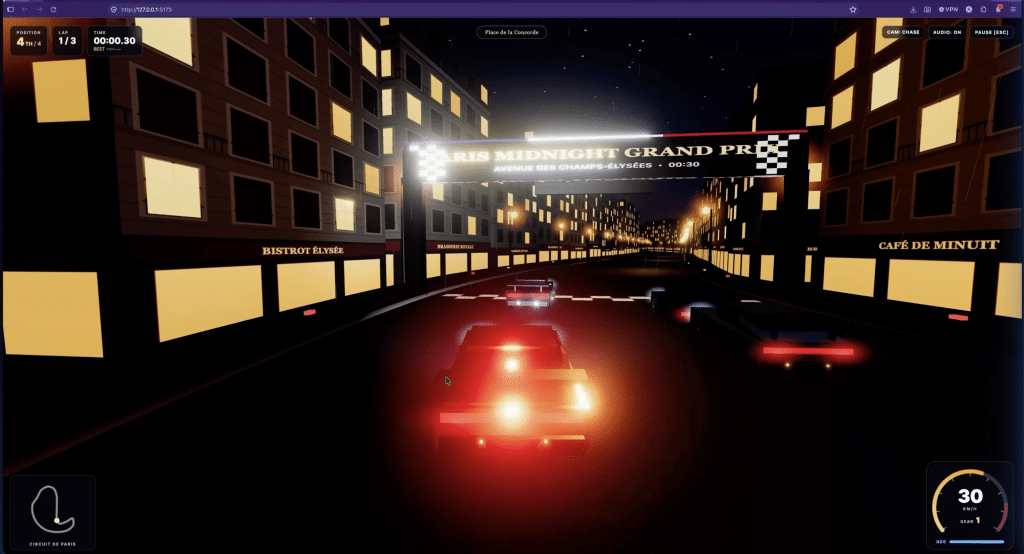
The verdict: Pretty basic. The car selection and core mechanics worked, and it threw some French words onto the walls, but the graphics were barebones and it didn’t look anything like Paris. If you’re looking for complex browser game generation, this isn’t where Neon shines.
Test 2: E-Commerce Landing Page (Water Bottle Flask)
Next, I moved into web development—asking Neon to build a complete e-commerce landing page for a water bottle flask with imagery and all the essential conversion sections.
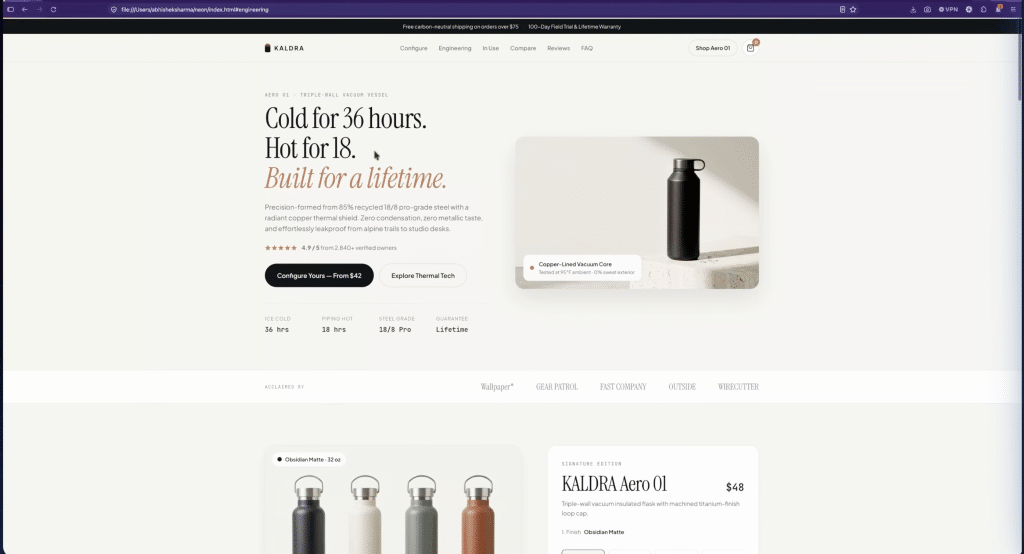
It worked for 4 minutes inside Antigravity, and the result genuinely impressed me. In fact, the typography, color palette, and overall polish reminded me heavily of what Claude Opus 5.5 produces. Neon built:
- Interactive product customization: Users can switch bottle capacities, change colors, add personal engravings, and toggle accessories like a flip straw, sport cap, or silicone base boot.
- A working cart: Clicking “Add to Bag” smoothly updates a slide-out cart drawer.
- Filterable reviews: Unlike Hydrogen (which completely forgot reviews in my earlier tests), Neon built a review section you can filter by tags like Thermal Performance and Trail & Travel.
- Conversion essentials: Working FAQs, a newsletter discount CTA, and a clean footer.
One quirk: The entire Gemini 4 family has a very “geeky” design DNA. Neon loves cramming detailed, technical specification tables onto front-facing landing pages. The data is useful, but it can feel a bit heavy for a consumer-facing homepage.
Running Neon solo for this build took 24 model calls and ~613,000 total tokens (129K uncached input, 437K cached reads, 46K output). Pairing it with Hydrogen in Orchestrator Mode would slash that cost dramatically.
Test 3: Head-to-Head vs. GPT-6.2 Sol (Motorcycle Brand Website)
To see how Neon stacks up against its main rival, I gave both Gemini 4 Neon and GPT-6.2 Sol the exact same prompt: build an English-language website for a Harley-Davidson-inspired motorcycle brand.
- Gemini 4 Neon (3 minutes): Delivered a complete, interactive experience—complete with a bike configurator, model sorting and filtering, a local dealer locator with addresses, FAQs, and a “Book a Test Ride” CTA.
- GPT-6.2 Sol: Generated a nice hero section, followed by two basic sections, and then just stopped. No bike customization, no sorting options, and far less depth.
Neon didn’t just build a better site—it finished faster, too.
A Quick Tip on the Gemini Frontend Design Skill
I also tested Neon with Google’s Gemini Frontend Design Skill enabled. While the skill produces a sleeker, more minimal aesthetic with a full-screen hero, I ran into a catch: on the motorcycle site, enabling the skill introduced some responsiveness issues. When I ran the exact same prompt without the skill, Neon delivered a fully responsive site right out of the box.
The Bottom Line
Gemini 4 Neon might not blow you away with 3D game development, but for web development and everyday coding workflows, it’s a standout release. It easily outperforms GPT-6.2 Sol in real-world builds and hits a great pricing sweet spot.
Right now, if you’re a developer, agency owner, or hobbyist building websites and apps, pairing Gemini 4 Neon + Gemini 4 Hydrogen in Antigravity’s Orchestrator Mode is easily one of the fastest, most cost-effective setups you can use.
Want to see the side-by-side website comparisons and live demos? Watch the full video breakdown on YouTube.

